How to Track Referrer, UTM Parameters, First-Visit URL, and Recent Page Views in Next.js

Summary
Standard tracking methods like
document.referrerfail in Next.js SPAs, causing you to lose the original lead source after a user's first click.This guide shows how to build a dependency-free attribution tracker using
localStorageto capture and preserve the true referrer, initial landing page, and first-touch UTM parameters.By hooking into the Next.js App Router, you can attach this complete attribution data to every form submission, providing clear insight into your marketing channels.
You've built your Next.js marketing site. You've wired up a contact form. A lead comes in — great! But when you open your CRM, all you see is a name, an email, and a message. You have zero idea if they found you via a Google ad, a Hacker News comment, or a tweet from a happy customer.
If you've ever tried to solve this, you've probably run into the same frustrating wall: document.referrer gives you the wrong thing after a client-side navigation, UTM parameters vanish the moment a user clicks to another page, and debugging routing in Next.js can be a genuine nightmare. The worst-case scenario is that if a user doesn't convert on their first visit, you lose the referral source forever.
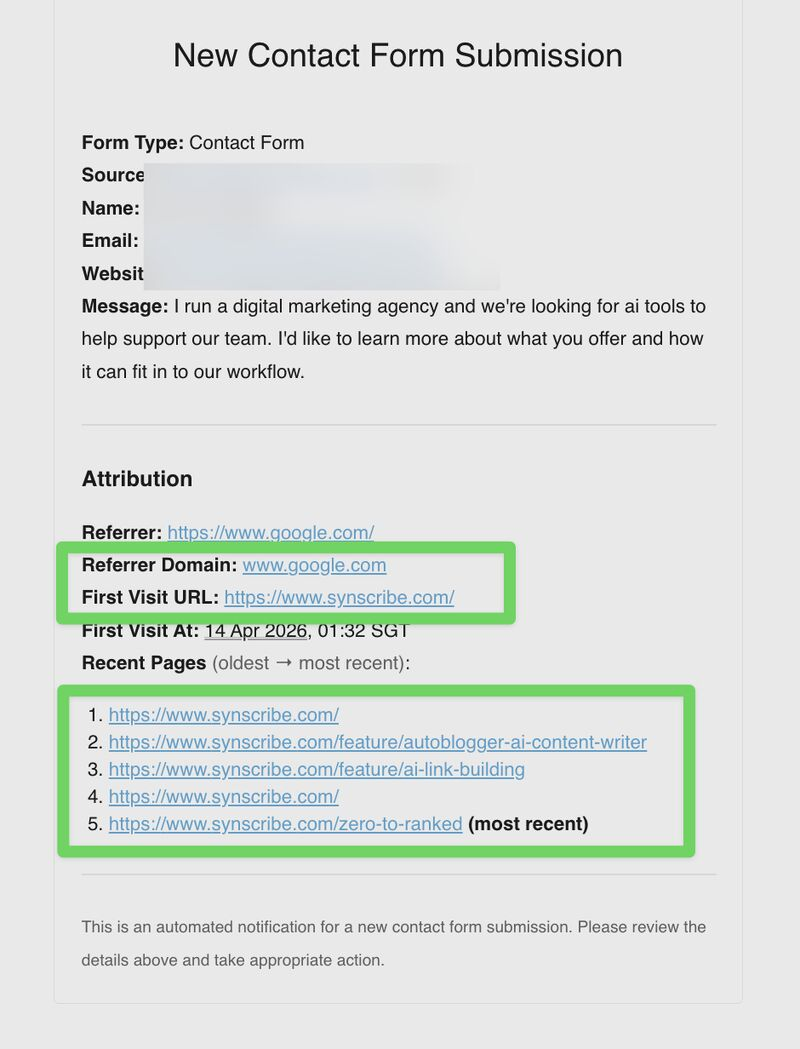 This guide fixes all of that. You'll build a small, dependency-free attribution tracker for the Next.js App Router that captures four pieces of visitor context and attaches them to every form submission:
Referrer URL & domain. The external page that sent the user to your site.
First-visit URL. The first page on your site they ever landed on.
First-touch UTM params.
utm_source,utm_medium,utm_campaign,utm_term,utm_content, frozen at the first pageview.Recent page views. A rolling buffer of the last N URLs they visited.
Why document.referrer Isn't Enough
Next.js apps are Single Page Applications (SPAs) under the hood. The History API (pushState / popState) changes the URL without a full page reload, which breaks the assumption most traditional tracking methods rely on.
Concretely, document.referrer has two problems here:
It reflects the referrer of the current document load — not the user's true external origin. The moment they click an internal link (say, from
/blogto/pricing),document.referrerbecomes your own domain. The original external referrer is gone forever.It tells you nothing about which landing page the user started on, or which UTM campaign brought them.
This is a well-known pain point in the Next.js community, documented in GitHub discussions and covered in depth in articles like Attribution Problems in SPAs and Fixing Rogue Referrals. Analytics tools like PostHog store $initial_referrer server-side, but that doesn't help you when you need the data inside the form payload that lands in your inbox or CRM.

The Design: First-Touch Attribution via localStorage
The strategy is straightforward:
On the very first pageview, freeze
document.referrer, the current URL, and anyutm_*query params intolocalStorage.On every subsequent pageview, append the URL to a rolling array — but do not overwrite the first-touch values.
At form submit, read the stored blob and include it in the POST body.
localStorage persists across full reloads and round-trips to other sites. It doesn't survive clearing site data or incognito mode — but for first-touch attribution, that tradeoff is acceptable. If you need something more durable, you can move first-visit capture into a Next.js middleware that sets an HttpOnly cookie instead.
Step 1: The Storage Module
Here's the core state container. Everything is synchronous because localStorage is synchronous, which keeps the form submit path simple.
// src/contexts/visitor-context.ts
const STORAGE_KEY = "visitor_context_v1";
const MAX_RECENT_PAGES = 10;
const UTM_KEYS = ["source", "medium", "campaign", "term", "content"] as const;

export type UtmParams = {
  source: string | null;
  medium: string | null;
  campaign: string | null;
  term: string | null;
  content: string | null;
};

export type VisitorContext = {
  referrerUrl: string | null;
  referrerDomain: string | null;
  firstVisitUrl: string | null;
  firstVisitAt: string | null;
  firstUtm: UtmParams | null;
  recentPages: string[];
};

const EMPTY: VisitorContext = {
  referrerUrl: null,
  referrerDomain: null,
  firstVisitUrl: null,
  firstVisitAt: null,
  firstUtm: null,
  recentPages: [],
};

function parseUtm(url: string): UtmParams | null {
  try {
    const params = new URL(url).searchParams;
    const utm: UtmParams = {
      source: params.get("utm_source"),
      medium: params.get("utm_medium"),
      campaign: params.get("utm_campaign"),
      term: params.get("utm_term"),
      content: params.get("utm_content"),
    };
    if (UTM_KEYS.every((k) => utm[k] === null)) return null;
    return utm;
  } catch {
    return null;
  }
}

function load(): VisitorContext {
  if (typeof window === "undefined") return { ...EMPTY };
  try {
    const raw = window.localStorage.getItem(STORAGE_KEY);
    if (!raw) return { ...EMPTY };
    const parsed = JSON.parse(raw) as Partial<VisitorContext>;
    return {
      referrerUrl: parsed.referrerUrl ?? null,
      referrerDomain: parsed.referrerDomain ?? null,
      firstVisitUrl: parsed.firstVisitUrl ?? null,
      firstVisitAt: parsed.firstVisitAt ?? null,
      firstUtm: parsed.firstUtm ?? null,
      recentPages: Array.isArray(parsed.recentPages) ? parsed.recentPages : [],
    };
  } catch {
    return { ...EMPTY };
  }
}

function save(ctx: VisitorContext): void {
  if (typeof window === "undefined") return;
  try {
    window.localStorage.setItem(STORAGE_KEY, JSON.stringify(ctx));
  } catch {
    // Fail quietly in private mode or if storage quota is exceeded
  }
}

export function recordPageview(url: string): void {
  if (typeof window === "undefined") return;
  const ctx = load();

  if (!ctx.firstVisitUrl) {
    ctx.firstVisitUrl = url;
    ctx.firstVisitAt = new Date().toISOString();
    ctx.firstUtm = parseUtm(url);
    const ref = document.referrer || null;
    if (ref && !ref.startsWith(window.location.origin)) {
      ctx.referrerUrl = ref;
      try {
        ctx.referrerDomain = new URL(ref).hostname;
      } catch {
        ctx.referrerDomain = null;
      }
    }
  }

  const last = ctx.recentPages[ctx.recentPages.length - 1];
  if (last !== url) {
    ctx.recentPages = [...ctx.recentPages, url].slice(-MAX_RECENT_PAGES);
  }

  save(ctx);
}

export function getVisitorContext(): VisitorContext {
  return load();
}
A few things worth noting in this implementation:
Same-origin referrer filter.
document.referrerwill be your own domain during internal navigation. The!ref.startsWith(window.location.origin)check ensures you only capture the true external source.First-touch by construction.
parseUtmis only called inside the!ctx.firstVisitUrlbranch, so UTMs are frozen on the very first pageview. Later navigations — with or without their own UTMs — don't overwrite attribution.nullinstead of an object of nulls. When no UTM keys are present,firstUtmis stored asnull. That makesif (visitor.firstUtm)a meaningful check downstream.Schema versioning. The
_v1suffix inSTORAGE_KEYmeans you can ship a new data shape later by bumping to_v2— old blobs are simply ignored.SSR-safe. Every function guards against
typeof window === "undefined", so importing this module from a Server Component is safe.
Step 2: Hook Into Next.js Route Changes
Middleware only runs on server requests — not on client-side navigations in the App Router. To track every SPA route change, you need to hook into pathname and searchParams from next/navigation, which update on every client-side transition.
// src/contexts/visitor-context-tracker.tsx
"use client";

import { usePathname, useSearchParams } from "next/navigation";
import { Suspense, useEffect } from "react";
import { recordPageview } from "@/contexts/visitor-context";

function VisitorContextTrackerInner() {
  const pathname = usePathname();
  const searchParams = useSearchParams();

  useEffect(() => {
    if (!pathname) return;
    let url = window.location.origin + pathname;
    const qs = searchParams.toString();
    if (qs) url = url + "?" + qs;
    recordPageview(url);
  }, [pathname, searchParams]);

  return null;
}

export function VisitorContextTracker() {
  return (
    <Suspense fallback={null}>
      <VisitorContextTrackerInner />
    </Suspense>
  );
}
Two Next.js-specific gotchas to be aware of:
useSearchParamsrequires a<Suspense>boundary. Without it, the entire subtree under your providers opts into dynamic (client-side) rendering. Wrapping the inner component in its own boundary localizes that behavior. See the Next.js router events docs for more context.Both
pathnameandsearchParamsare in the dependency array. This ensures a pageview is recorded even when only the query string changes — which is exactly when UTM parameters arrive.
Mount this tracker in your root providers file so it runs on every page:
// src/app/providers/index.tsx
"use client";

import { VisitorContextTracker } from "@/contexts/visitor-context-tracker";

export function Providers({ children }: { children: React.ReactNode }) {
  return (
    <>
      <VisitorContextTracker />
      {children}
    </>
  );
}
Then wrap {children} in app/layout.tsx with <Providers>. The tracker renders null, so it has zero visual footprint — it's purely a side-effect host.
Step 3: Read the Data at Form Submit
At submit time, call getVisitorContext() and include the fields in your POST body alongside the regular form data. Because getVisitorContext() is synchronous, there's no race condition to worry about.
// src/components/contact/contact-form.tsx
"use client";

import { getVisitorContext } from "@/contexts/visitor-context";

const onSubmit = async (data: ContactFormValues) => {
  const visitor = getVisitorContext();

  await fetch("/api/contact-form", {
    method: "POST",
    headers: { "Content-Type": "application/json" },
    body: JSON.stringify({
      ...data,
      referrerUrl: visitor.referrerUrl,
      referrerDomain: visitor.referrerDomain,
      firstVisitUrl: visitor.firstVisitUrl,
      firstUtm: visitor.firstUtm,
      recentPages: visitor.recentPages,
    }),
  });

  // Fire an analytics event with flattened snake_case properties —
  // easier to query in PostHog, Mixpanel, or similar tools.
  track("form_submitted", {
    email: data.email,
    referrer_url: visitor.referrerUrl,
    referrer_domain: visitor.referrerDomain,
    first_visit_url: visitor.firstVisitUrl,
    first_utm_source: visitor.firstUtm?.source ?? null,
    first_utm_medium: visitor.firstUtm?.medium ?? null,
    first_utm_campaign: visitor.firstUtm?.campaign ?? null,
    first_utm_term: visitor.firstUtm?.term ?? null,
    first_utm_content: visitor.firstUtm?.content ?? null,
    recent_pages: visitor.recentPages,
  });
};
Note the intentional asymmetry: firstUtm is sent to your API as a nested object (cleaner schema, less repetition), but flattened into individual snake_case keys for the analytics event. Flat properties are far easier to filter and group by in tools like PostHog or Mixpanel.
Step 4: Validate on the API Route
On the server, accept all attribution fields as optional and nullable. The client is hostile — you don't want a Zod parse failure because a browser returned null for referrerUrl.
// src/app/api/contact-form/route.ts
import { z } from "zod";

const contactSchema = z.object({
  email: z.string().email(),
  message: z.string().min(10),
  referrerUrl: z.string().nullish(),
  referrerDomain: z.string().nullish(),
  firstVisitUrl: z.string().nullish(),
  firstUtm: z
    .object({
      source: z.string().nullish(),
      medium: z.string().nullish(),
      campaign: z.string().nullish(),
      term: z.string().nullish(),
      content: z.string().nullish(),
    })
    .nullish(),
  recentPages: z.array(z.string()).nullish(),
});

export async function POST(request: Request) {
  const body = await request.json();
  const data = contactSchema.parse(body);
  // data.referrerUrl, data.firstVisitUrl, etc. are all typed correctly
  // Send to your email provider, CRM, database...
}
z.string().nullish() accepts string | null | undefined, which matches what the client sends after JSON.stringify round-trips a null.
Viewing UTM Data in Your Analytics Platform
If you're also using an analytics tool alongside this setup, you don't need to do much extra work for UTMs specifically. As one developer noted in this Reddit thread, "GA4 does not require any manual inputs when it comes to UTMs on the tracking part." Just navigate to GA4 → Reports → Acquisition → Traffic acquisition and look for the Session source / medium and Session campaign dimensions.
If you prefer a privacy-first, cookie-less approach — especially useful if you want to track anonymous visitors without login friction — two strong options are:
Vercel Web Analytics: Built-in, privacy-first, no cookies. Identifies visitors via a short-lived hash rather than persistent identifiers.
Umami: Lightweight, open-source, no cookies required. Highly recommended by developers in this community thread for exactly this use case.
Where to Take This Further
Once the basics are working, a few extensions are worth considering:
Capture click IDs from ad networks. Google (
gclid), Meta (fbclid), and Microsoft (msclkid) all use their own non-standard parameters. ExtendparseUtm— or add a siblingparseClickIdsfunction — if you need to attribute paid spend back to specific ad clicks.Add timestamps to page views.
recentPagesis currently just URLs. Changing it to store{ url, at }tuples lets you reconstruct time-on-site and dwell time per page.Harden with a server-set cookie. If you need this data to survive JavaScript being disabled, move first-visit capture into Next.js Middleware that sets an
HttpOnlycookie. Your client-side tracker then only needs to maintainrecentPages.Clear on conversion. For multi-step funnels, consider resetting the stored context after a successful signup so the next journey starts fresh rather than inheriting first-touch data from a previous session.
What You've Got
On every form submission, you now have a complete picture of how the lead found you:
Field | What it tells you |
|---|---|
| The external site that sent them (great for top-of-funnel attribution) |
| Which landing page actually converts |
| Which campaign, source, and medium drove the session |
| What they read before submitting — gold for sales context |
Total cost: one storage module (~80 lines), one tracker component (~20 lines), zero npm dependencies. The data ships to both your API route and your analytics backend in a single form submit.
One final note: as the broader developer community has recognized, attribution will never be perfectly clean. Private browsing, ad blockers, cross-device journeys, and long sales cycles all introduce noise. The goal isn't perfection — it's directional signal that helps you make better marketing decisions. This setup gives you that signal, reliably, without a third-party dependency or a complicated analytics stack to maintain.
Turning this raw attribution data into a winning strategy is the next step. If you need to connect visitor behavior to content performance and SEO, you can explore Synscribe's platform to see how better data drives revenue.
Frequently Asked Questions
Why doesn't document.referrer work for tracking in Next.js?
document.referrer fails in Next.js because it's a Single Page Application (SPA). After the first client-side navigation (e.g., from a blog post to the contact page), document.referrer updates to your own domain, losing the original external source. This method preserves the true first referrer by saving it in localStorage on the initial page load.
What is first-touch attribution and why is it important?
First-touch attribution credits a conversion to the very first marketing channel a user interacted with. It's crucial for understanding which top-of-funnel channels (like an ad campaign or organic search) are most effective at bringing valuable visitors to your site, even if they browse several pages or visit again later before converting.
How does this tracking solution handle UTM parameters?
This solution captures and "freezes" UTM parameters (utm_source, utm_medium, etc.) from the user's very first landing page URL. It stores them in localStorage, so even if the user navigates to other pages without UTMs, the original attribution data is preserved and can be attached to any form submission during their session.
Is using localStorage for tracking compliant with privacy laws like GDPR?
Using localStorage for functional tracking like this is generally less intrusive than third-party tracking cookies. However, you should still disclose its use in your privacy policy and consider obtaining user consent, especially under GDPR. This method does not store personally identifiable information (PII) by default, which helps with compliance.
What happens if a user clears their browser data or has JavaScript disabled?
This implementation relies on client-side JavaScript and localStorage. If JavaScript is disabled, the tracker will not run. If a user clears their site data (including localStorage), the attribution context will be lost and will reset on their next visit. For more robust tracking, you can supplement this with a server-set HttpOnly cookie via Next.js middleware.
How can I test that the attribution tracking is working correctly?
You can test this in your browser's developer tools. Open the "Application" tab, select "Local Storage," and find the key visitor_context_v1. Visit your site from an external link (or simulate one) with UTM parameters. You should see the localStorage value populate. Then, navigate internally and confirm the "first-touch" data does not change.
Dominate ChatGPT and Google Search
Synscribe helps B2B companies with SEO & GEO using programmatic SEO approach. Book a call to find out how we help you win.