How to Scrape LinkedIn Post Reactions with Synscribe's LinkedIn Profile Scraper Extension
Summary
LinkedIn post reactions are a goldmine for leads, but scraping them traditionally poses a significant risk of account suspension.
Analyzing who reacted and how (e.g., 'Insightful' vs. 'Like') provides actionable intelligence for personalized sales outreach, recruitment, and content strategy.
The safest scraping method involves using a tool that processes all information locally in your browser, never exposing your credentials or sending data to external servers.
Synscribe's free LinkedIn Profile Scraper lets you securely extract this data with a few clicks, turning passive engagement into an organized list of opportunities.
You've stumbled across a viral LinkedIn post with hundreds of reactions and wished for a simple way to capture all those profiles without tediously clicking on each one. Perhaps you've even considered scraping this goldmine of potential leads but hesitated due to stories about LinkedIn's notorious bot detection systems and account bans.
"I don't want to lose my LinkedIn account access!" is a common concern, especially when LinkedIn is vital for your professional networking or job search. Yet the platform's native analytics are frustratingly limited, failing to provide the detailed engagement data you need.
There's good news: Synscribe's LinkedIn Profile Scraper offers a secure, efficient solution that processes all data locally in your browser—never sending your information to external servers. This free Chrome extension lets you extract post reactions with just a few clicks, all while maintaining the privacy and security of your LinkedIn account.
The Untapped Goldmine: Why LinkedIn Reactions Matter More Than You Think
LinkedIn reactions aren't just vanity metrics—they're valuable signals of user sentiment and intent that can inform your content strategy and lead generation efforts. Each reaction type offers a unique insight:
👍 Like: Basic approval, often used for general announcements and updates
👏 Celebrate: Encouragement for achievements and milestones
🤝 Support: Empathy for personal stories or social causes
❤️ Love: Deeper appreciation for heartfelt, mission-driven content
💡 Insightful: Admiration for content that adds unique value or surprising perspectives
😂 Funny: Amusement for light-hearted, joyful content
According to Sendible, these reactions can tell you much more about your audience than simple engagement metrics. A high number of "Insightful" reactions validates your thought leadership, while "Support" and "Love" reactions indicate you've established a strong emotional connection with your audience.
By capturing who reacted (and how they reacted) to specific content, you gain actionable intelligence for personalized outreach, targeted marketing, and content optimization.
Introducing Synscribe's LinkedIn Profile Scraper: A Secure & Efficient Tool
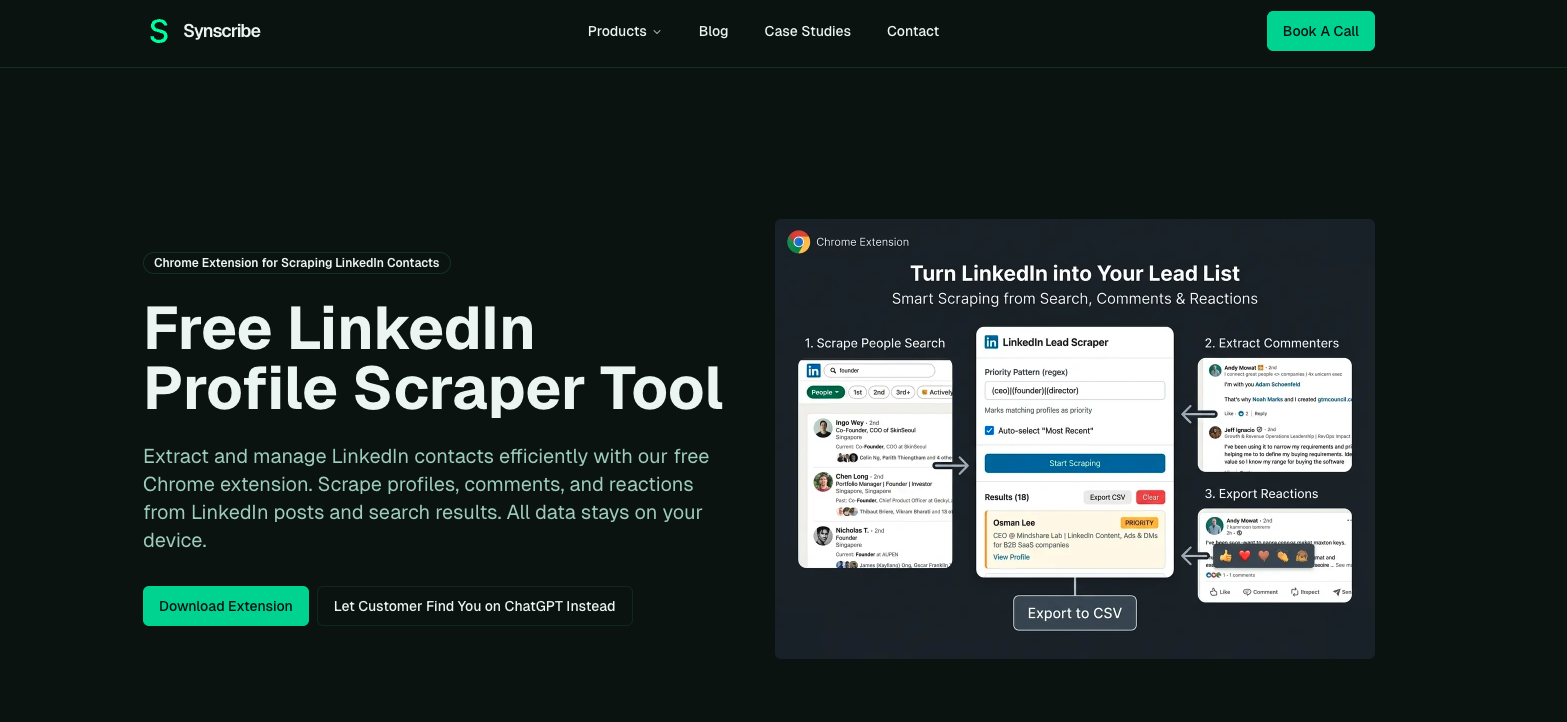 Synscribe's LinkedIn Profile Scraper stands out in the crowded field of scraping tools due to its unique approach to privacy and security. Unlike many alternatives that require your login credentials or process data on external servers (raising significant security concerns), Synscribe operates entirely within your browser.
This means all scraping is conducted locally—data never leaves your device. This architecture dramatically reduces the risk of triggering LinkedIn's anti-bot systems while ensuring complete user privacy.
Key features that make Synscribe particularly valuable include:
Reaction Scraper: Collect profiles of users who react to LinkedIn posts
Comment Scraper: Identify and extract engaged prospects from comment sections
Profile Scraper: Extract comprehensive data from LinkedIn profiles and search results
Advanced Filtering: Use regex patterns to include/exclude profiles based on criteria like job title, company, or location
Real-time Streaming & Control: Monitor scraping as it happens with pause/resume functionality
CSV Export: Export all collected data for seamless integration with your CRM or spreadsheet tools
A Practical Walkthrough: Scraping Post Reactions in 6 Simple Steps
Let's walk through exactly how to use Synscribe's extension to scrape LinkedIn post reactions:
Step 1: Install the Extension
First, download and install Synscribe's LinkedIn Profile Scraper directly from the Chrome Web Store. The extension is free and installs in seconds.
Step 2: Login to LinkedIn
Ensure you're logged into your LinkedIn account. The extension works within your active session without storing or compromising your credentials.
Step 3: Navigate to the Target Post
Find the LinkedIn post from which you want to scrape reactions. This can be one of your own posts, a competitor's, or an industry influencer's post with significant engagement.
Step 4: Activate the Reaction Scraper
Click on the Synscribe extension icon in your browser's toolbar. From the dropdown menu, select the "Reaction Scraper" option to begin the process.
The extension will automatically detect the post you're viewing and prepare to extract reaction data. You'll see a confirmation dialog showing the number of reactions detected.
Step 5: Monitor the Process
Once initiated, you can watch in real-time as the extension collects profile information from each reaction. The intuitive interface displays:
A progress counter showing completed vs. total reactions
Names and basic information of profiles being scraped
A live data preview showing what's being captured
One of Synscribe's most appreciated features is the ability to pause the scraping process at any time. This gives you control to review the data being collected before proceeding or to take a break without losing progress.
Step 6: Export the Data
When the scraping is complete (or once you've collected enough data), click the "Export" button. The data will be downloaded as a CSV file, ready for import into your sales or marketing tools.
The exported file includes comprehensive information about each person who reacted, including:
Full name and headline
Current company and position
Location information
Profile URL for easy reference
Type of reaction (Like, Celebrate, Support, etc.)
As demonstrated in this step-by-step video guide, the entire process from installation to export typically takes just a few minutes, depending on the number of reactions you're scraping.
Turning Data into Opportunity: Practical Use Cases for Scraped Reactions
Now that you have this valuable reaction data, how can you leverage it for business impact? Here are practical applications across different professional roles:
For Sales Professionals
Extract profiles of users who reacted with "Insightful" or "Love" to your industry-related content. These warm leads have already shown interest in your topic area, making them prime candidates for personalized outreach. Reference the specific post they engaged with as a natural conversation starter.
For example: "Hi [Name], I noticed you found my post about [topic] insightful. I'd love to share some additional research we've done in this area that might benefit your team at [Company]."
For Recruiters
Identify potential candidates by scraping reactions on posts from industry thought leaders or your company's career-related content. Filter the results by job title to find qualified talent already showing engagement with your industry or organization.
This approach is particularly effective for passive candidate recruitment, as these professionals aren't actively job hunting but have demonstrated interest in relevant topics.
For Content Marketers
Analyze the job titles, industries, and seniority levels of users reacting to different types of content. This data helps you:
Refine your target audience profile
Discover which content formats and topics resonate with specific segments
Identify unexpected audience groups showing interest in your content
For instance, if you notice a pattern of procurement professionals reacting to your supply chain automation content, you might create more tailored material for this previously overlooked segment.
Best Practices for Safe and Effective Scraping
While Synscribe's local processing approach significantly reduces risk compared to cloud-based scrapers, it's still important to follow best practices when scraping LinkedIn data:
Respect LinkedIn's Rate Limits
LinkedIn, like most platforms, has mechanisms to detect unusual activity. To minimize risk:
Avoid running the scraper for excessively long periods
Don't attempt to scrape thousands of profiles in a single session
Take breaks between scraping sessions to mimic natural browsing patterns
Be Mindful of Data Privacy Regulations
Remember that just because you can scrape data doesn't mean you can use it for any purpose. Depending on your location and the location of the profiles you're scraping, different privacy regulations (like GDPR in Europe) may apply to how you store and use this data.
Keep Your Extension Updated
Synscribe regularly updates the extension to adapt to LinkedIn's interface changes and improve functionality. Make sure you're always using the latest version for optimal performance and security.
Focus on Quality Over Quantity
Rather than attempting to scrape every reaction on LinkedIn, focus on high-value posts with engaged audiences relevant to your goals. A targeted approach yields more actionable data and reduces risk.
According to Skrapp.io, many LinkedIn scraping tools operate in a gray area regarding LinkedIn's Terms of Service. Synscribe's approach of local processing is designed to be less intrusive than tools requiring your account credentials, but always use any scraping tool responsibly.
Synscribe in the LinkedIn Scraping Landscape
To put Synscribe's value in context, let's briefly compare it with other popular LinkedIn scraping solutions:
Phantombuster (starts at $48/month) offers comprehensive automation capabilities across multiple platforms but requires your LinkedIn credentials and processes data on their servers. While powerful, this approach raises security concerns and carries a higher risk of account flagging.
Waalaxy provides advanced CRM integration and automated outreach sequences but focuses more on engagement automation than data extraction. Its pricing starts at €39/month.
Evaboot specializes in LinkedIn prospecting and automated messaging, with pricing starting around $29/month.
What sets Synscribe apart in this landscape is its combination of:
Privacy-first architecture: All processing happens locally in your browser, dramatically reducing security risks
User-friendliness: Simple, intuitive interface requiring no technical expertise
Zero cost: Free access to powerful scraping capabilities without subscription fees
Focused functionality: Specialized tools for specific high-value extraction tasks
While comprehensive automation suites like Phantombuster offer complex, cross-platform workflows, Synscribe excels in its simplicity, security, and focus. It's the ideal tool for professionals who need to perform specific, high-value extraction tasks without the cost and security risks of larger platforms.
Conclusion: Transform LinkedIn Engagement Into Tangible Opportunities
LinkedIn reactions represent a goldmine of potential business opportunities, but only if you can efficiently collect and leverage this data. Synscribe's LinkedIn Profile Scraper offers a secure, user-friendly solution that operates entirely within your browser—protecting your privacy while delivering powerful data extraction capabilities.
By following the simple six-step process outlined in this guide, you can quickly gather valuable information about who's engaging with content relevant to your business. Whether you're prospecting for sales leads, identifying recruitment candidates, or refining your content strategy, this reaction data provides actionable insights that drive results.
Ready to unlock a new level of insight from LinkedIn? Download Synscribe's LinkedIn Profile Scraper from the Chrome Web Store today and start transforming engagement into opportunity.
Remember, with great power comes great responsibility—always use scraping tools ethically and in compliance with relevant data privacy regulations. When used properly, Synscribe can become an invaluable addition to your professional toolkit, providing the data you need to make more informed business decisions without compromising your LinkedIn account security.
Frequently Asked Questions
What is a LinkedIn reaction scraper and why is it useful?
A LinkedIn reaction scraper is a tool that automates the collection of profile data from users who have reacted to a LinkedIn post. It is incredibly useful for sales professionals, recruiters, and marketers because it transforms passive engagement (likes, loves, etc.) into an organized list of warm leads, potential candidates, or engaged audience members, complete with their professional details for targeted outreach and analysis.
Is it safe to use Synscribe to scrape LinkedIn profiles?
Yes, Synscribe is designed to be one of the safest LinkedIn scraping tools available. Unlike many other tools, it operates entirely within your browser and processes all data locally on your computer. This means your LinkedIn credentials are never shared, your data never leaves your device, and the tool's activity is less likely to be flagged by LinkedIn's bot detection systems, significantly reducing the risk to your account.
How does the Synscribe LinkedIn Profile Scraper work?
The Synscribe scraper works as a simple Chrome extension that you activate while on a LinkedIn page. To scrape post reactions, you navigate to the target post, click the Synscribe icon in your browser, select the "Reaction Scraper," and the tool automatically begins collecting profile data from the list of reactions. The process is monitored in real-time and you can export the collected data to a CSV file with a single click.
What specific data can I export from LinkedIn post reactions?
When you export data using the Synscribe reaction scraper, you receive a detailed CSV file containing key professional information for each person who reacted. This typically includes their full name, job title or headline, current company, location, the specific type of reaction they used (e.g., Like, Insightful, Love), and a direct link to their LinkedIn profile.
Can I scrape more than just post reactions with this tool?
Yes, absolutely. While this guide focuses on scraping post reactions, Synscribe's LinkedIn Profile Scraper is a multi-functional tool. You can also use it to extract data from comment sections (to find highly engaged users) and scrape profiles directly from LinkedIn search results, making it a versatile tool for various data collection needs.
How is Synscribe different from other LinkedIn scrapers like Phantombuster?
Synscribe's primary difference lies in its security architecture and cost. Unlike server-based tools like Phantombuster that require your account credentials and process data on external servers, Synscribe runs locally in your browser, offering superior privacy and a lower risk profile. Furthermore, Synscribe is a free tool focused on user-friendly data extraction, whereas many alternatives are complex, paid automation suites designed for broad, cross-platform workflows.
Are there any limits to how many profiles I can scrape?
While the Synscribe extension itself does not impose a hard limit, it is crucial to respect LinkedIn's fair use policies to protect your account. To minimize risk, you should avoid scraping excessively large volumes of data (thousands of profiles) in a single, continuous session. It is best practice to scrape in smaller, targeted batches and take breaks to mimic natural human browsing behavior.
Dominate ChatGPT and Google Search
Synscribe helps B2B companies with SEO & GEO using programmatic SEO approach. Book a call to find out how we help you win.