How to Implement IndexNow on Framer Sites
 Summary
Getting your Framer site indexed by search engines can take days, but the IndexNow protocol can slash this waiting time to just minutes.
Framer's built-in "well-known files" feature makes setup easy, allowing you to instantly notify search engines like Bing of content updates with a simple file upload.
This is a quick technical SEO win for any paid Framer plan user. For more complex challenges, Synscribe's full-stack engineering team offers technical SEO audits and direct implementation.
You've spent hours perfecting your Framer site, creating stunning visuals and compelling content. But now comes the frustrating wait - when will search engines discover your masterpiece? If you're tired of waiting days or weeks for your pages to appear in search results, there's a simple solution that takes just minutes to implement.
Many Framer users struggle with technical SEO tasks like adding verification files to their site's root directory. The good news? Framer now offers a built-in solution that makes implementing IndexNow incredibly straightforward - no complex workarounds required.
In this guide, I'll show you how to leverage Framer's "well-known files" feature to instantly notify search engines whenever you update your content, potentially slashing indexing time from days to minutes.
What is IndexNow and Why Should You Care?
IndexNow is an open protocol that allows website owners to instantly notify search engines when content has been added, updated, or deleted. Instead of passively waiting for search engines to discover your changes (the traditional "pull" model), IndexNow lets you actively "push" notifications about your content updates.
The key benefits include:
Faster indexing: Content changes can be discovered and reflected in search results within minutes rather than days or weeks
More efficient crawling: Search engines can focus on crawling the specific URLs you submit rather than repeatedly checking unchanged pages
Better resource utilization: Reduces unnecessary crawl traffic to your site
While IndexNow is supported by Microsoft Bing, Yandex, Naver, Seznam.cz, and Yep, it's worth noting that Google hasn't joined the initiative yet. Some SEO professionals express concern about this limitation, with one noting, "the biggest problem is that it's Bing and not Google." However, implementing IndexNow remains a low-effort SEO task that can deliver meaningful benefits, especially as its adoption grows.

Using Framer's "Well-Known Files" Feature for IndexNow
Before Framer introduced their "well-known files" feature, implementing IndexNow required complex workarounds using Cloudflare Workers. Now, the process is remarkably simple if you're on a Framer Pro, Business, or Enterprise plan.
Here's how to set up IndexNow on your Framer site in just a few steps:
Step 1: Generate Your IndexNow API Key
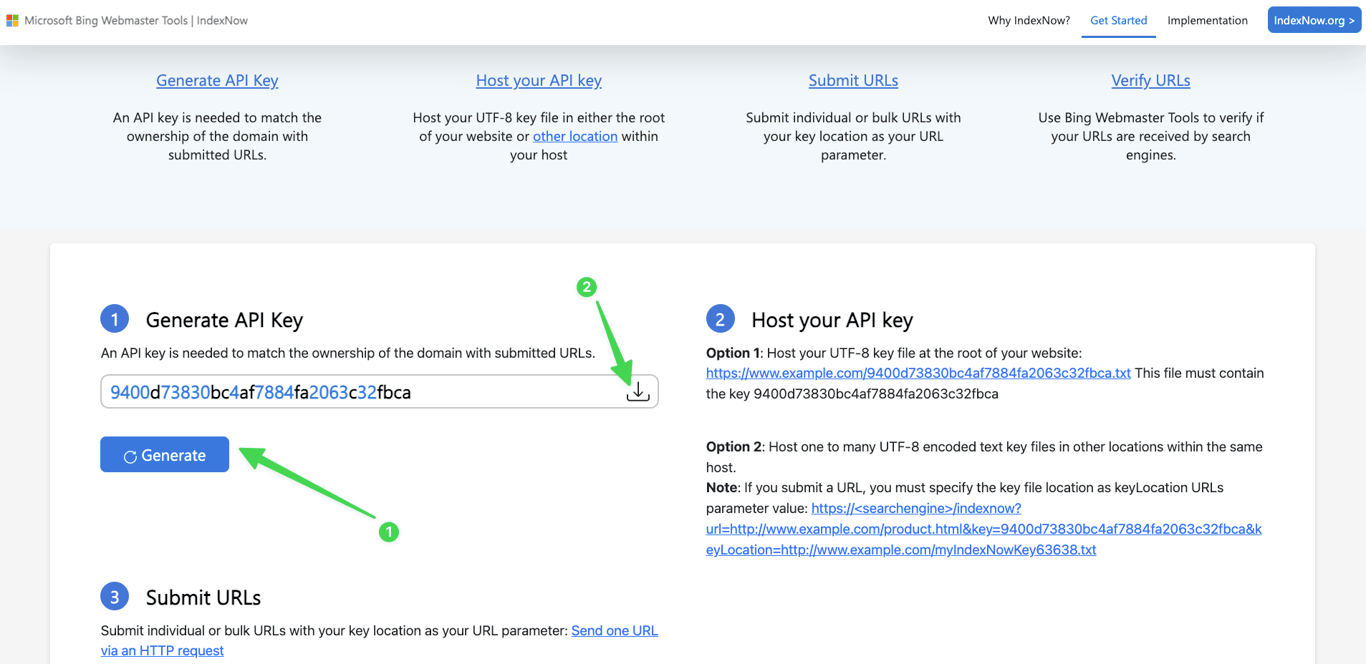
You can generate a key using Bing Webmaster Tools or Ahrefs' IndexNow feature (ahref specfic instructions below)
Your key will be a string of hexadecimal characters (e.g.,
b53681680f6c4c1a9c74211b5daced44)
Step 2: Create Your Verification File
Create a plain text file using any text editor
Name the file with your key followed by .txt (e.g.,
b53681680f6c4c1a9c74211b5daced44.txt)Inside the file, paste only your key (e.g.,
b53681680f6c4c1a9c74211b5daced44)Save the file with UTF-8 encoding
Step 3: Upload the File to Your Framer Project
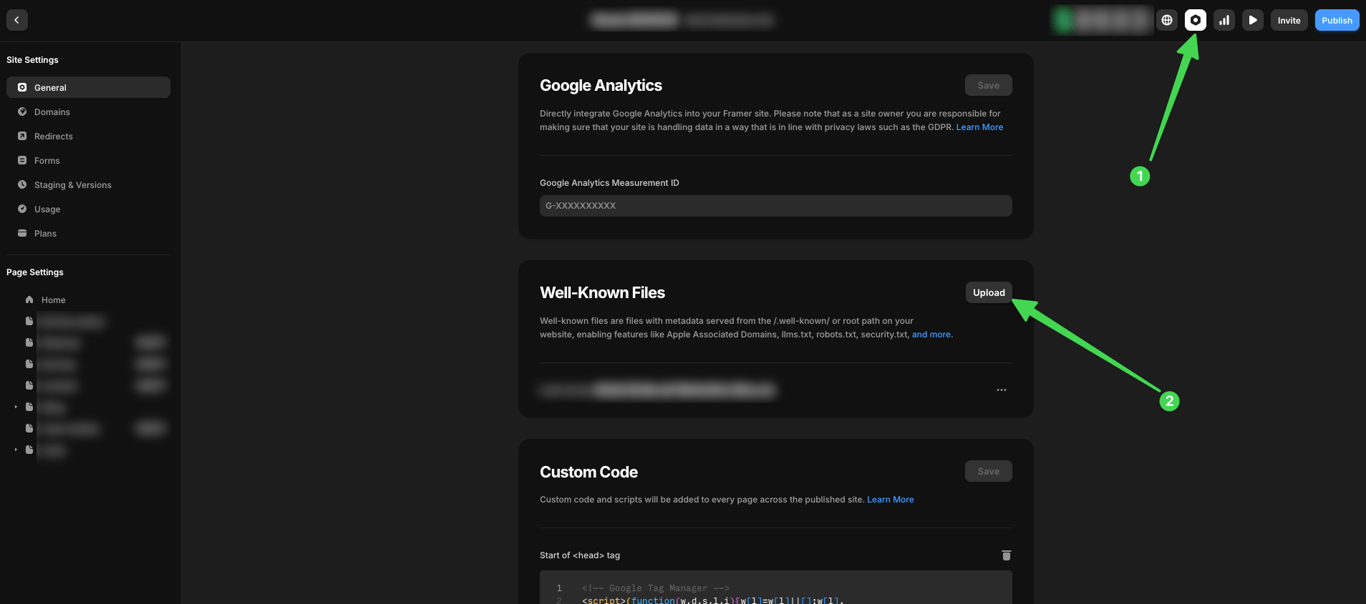
This is where Framer's "well-known files" feature makes the process incredibly simple:
In your Framer project, navigate to Site Settings
Scroll down to find the "Well-Known Files" section
Click to upload your .txt verification file
Framer automatically places the file in the correct location at your site's
/.well-knowndirectoryPublish your site (if you have staging enabled, deploy to production)
Step 4: Verify Your Setup
Check that your file is accessible by visiting
https://yourdomain.com/.well-known/your-key.txtin your browserReturn to the tool where you generated your key (e.g., Bing Webmaster Tools) and verify your ownership
Additional Redirect
From our research different search engines have different verification logic and submission flow.
For instance, some of them will take your submission in a 'queue' and return a '202' code while others will accept it immediately and return a '200' code.
There are also search engines that requires the key file to be in the root directory instead of the /.well-known directory. For those you may have to add a redirect from the root directory to the well-known directory.
Here's how you can do that in Framer:
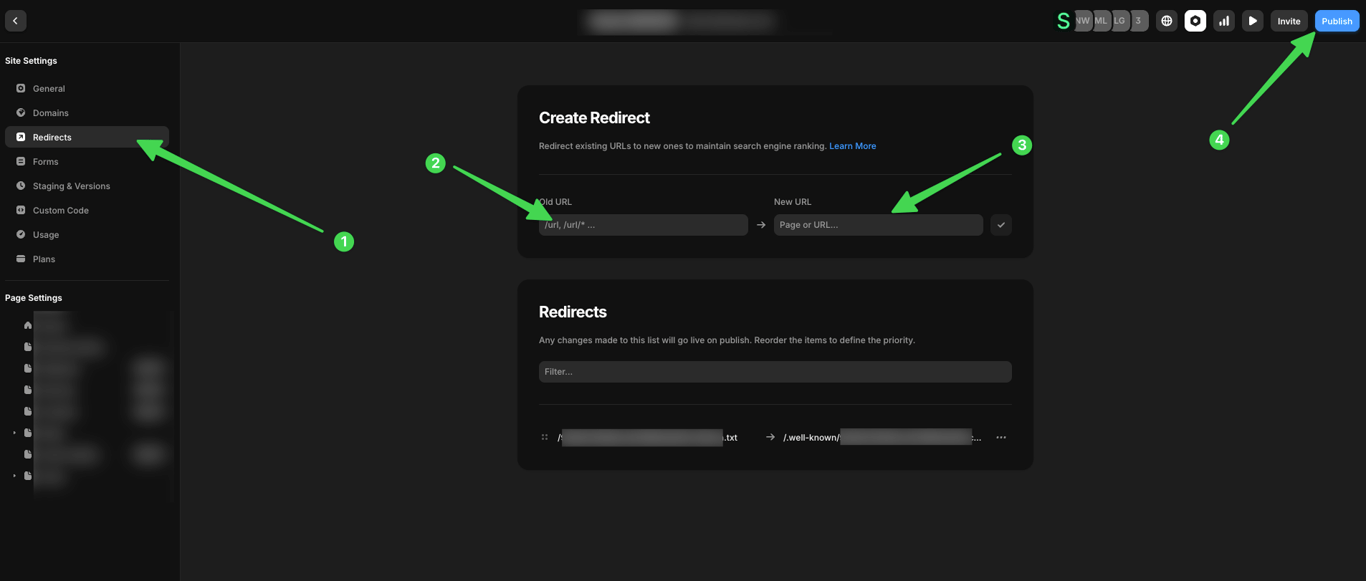
Go to 'Redirects' in setting
Enter the old url as
/<your-key-here>.txtEnter the new url as
/.well-known/<your-key-here>.txt
This will make your .txt file appear to be on the root. Take note that while this work for most of the engines now, there are still a few that does not support the redirect method as well. In those cases, the cloudflare method (mentioned below) would work the most reliably but will require more work.
Submitting URLs to IndexNow
Once you've set up verification, you can start notifying search engines about your content changes. While some tools like Ahrefs' Site Audit will handle this automatically when you setup indexnow for Framer, you can also submit URLs manually:
For a Single URL:
Use an HTTP GET request in this format:
https://api.indexnow.org/indexnow?url=https://yourdomain.com/your-page&key=your-keyFor example:
https://api.indexnow.org/indexnow?url=https://www.example.com/product.html&key=b53681680f6c4c1a9c74211b5daced44For Multiple URLs (up to 10,000):
Use an HTTP POST request with a JSON body:
POST /indexnow HTTP/1.1
Content-Type: application/json; charset=utf-8
Host: api.indexnow.org
{
  "host": "www.yourdomain.com",
  "key": "your-key",
  "urlList": [
    "https://www.yourdomain.com/page1",
    "https://www.yourdomain.com/blog/post2",
    "https://www.yourdomain.com/products/item3"
  ]
}
Automating IndexNow with Ahrefs Site Audit
If you use Ahrefs on a Pro plan, you can automate IndexNow submissions directly within their Site Audit tool. Here's how to set it up.
Setting up IndexNow in Site Audit
You can set up IndexNow in Site Audit by navigating to Project settings > Site Audit > Crawl settings, and then locating the IndexNow section.
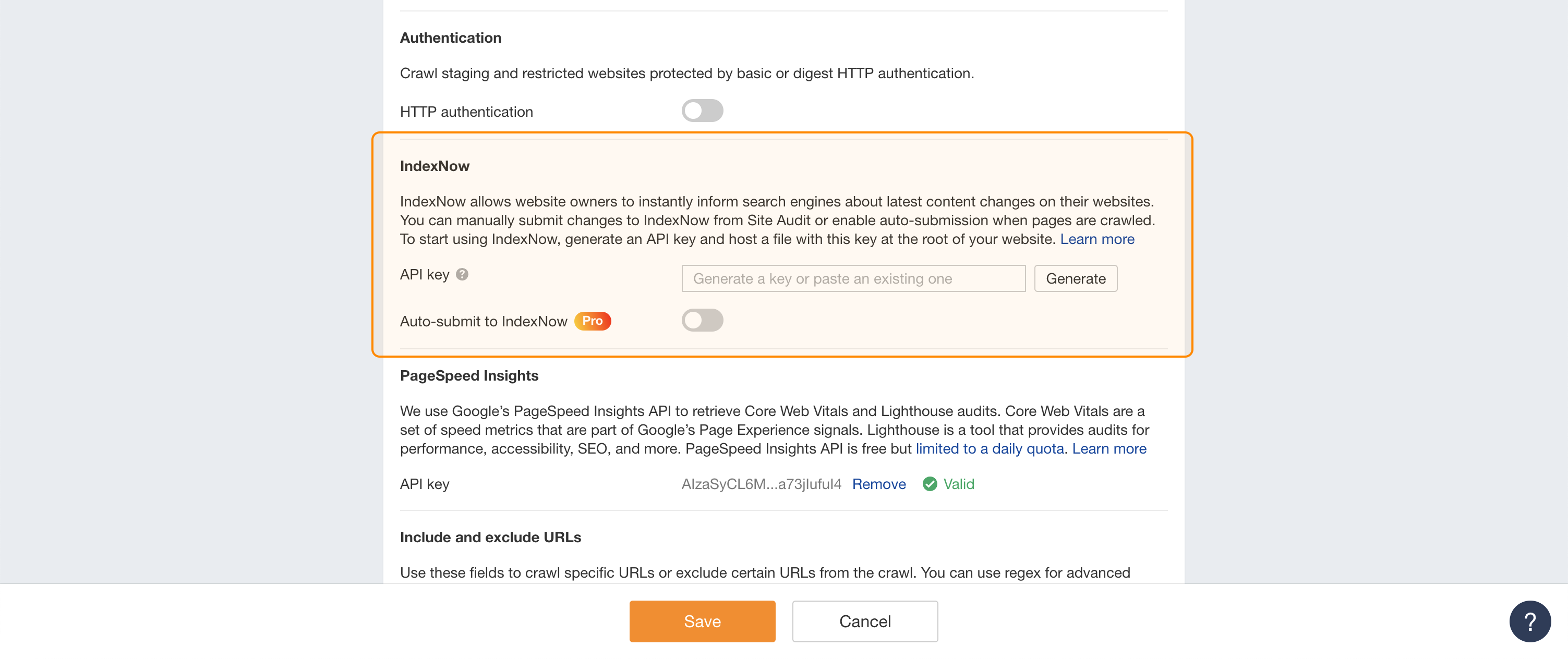 If you don't have an API key, you can generate a new one directly in this section. However, don't forget to host the key file at the root of your website, as mentioned above. If you already have a key, simply paste it into the input box.
Please ensure that your website is accessible to AhrefsBot, so they can crawl and verify the key file.
There are two ways to submit URLs to IndexNow via Site Audit:
You can submit the necessary pages manually from the Site Audit reports. We suggest using the pre-configured "Pages to submit to IndexNow" issue that selects pages with content changes recommended to submission.
Another way is to enable auto-submission, and Site Audit will automatically submit the changes you select when it crawls your site. Please note that your project needs an upgrade boost that supports the auto-submission to IndexNow feature to enable it.
After everything is set, don't forget to save the settings.
Manual submission to IndexNow
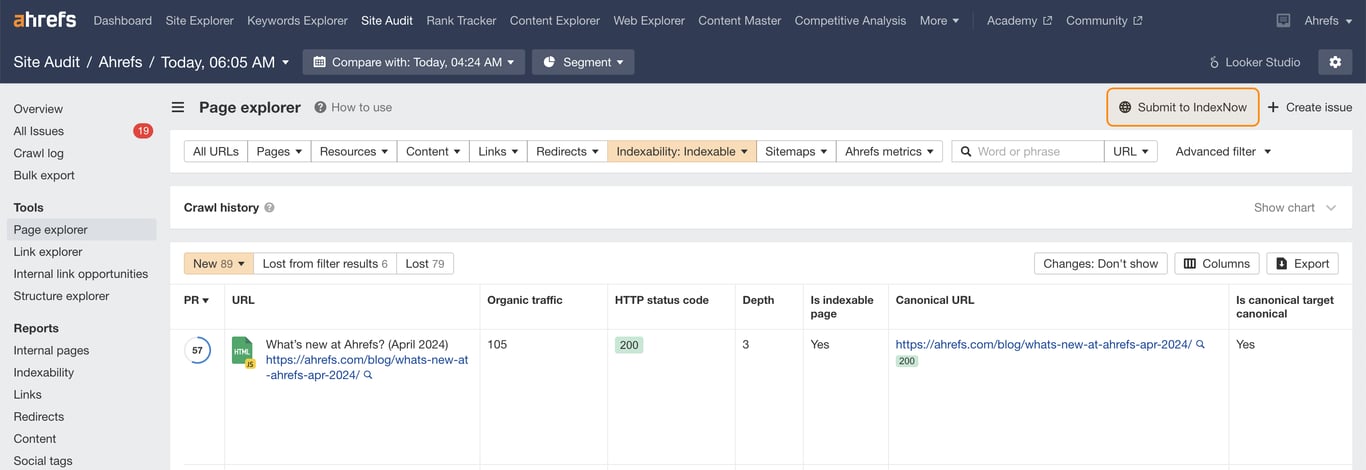
To submit multiple URLs in bulk, open Page Explorer, filter the URLs you want to submit, and click the "Submit to IndexNow" button. This will submit all the URLs in the current report to IndexNow.
To avoid wasting your crawl budget, we recommend ensuring that all submitted pages have relevant and positive changes. You can review the pages recommended for submission in the pre-configured "Pages to submit to IndexNow" issue. This issue automatically selects pages with content changes, as well as newly redirected or removed pages. You can also create your own custom issue with specific filter conditions or exclude certain pages from the report.
To submit an individual URL to IndexNow, open the URL details panel and click the "Submit to IndexNow" button.
After submitting the URLs, you'll receive a success notification. If there's an issue, such as a missing key file on your site, Site Audit will inform you about the error.
Auto-submission to IndexNow
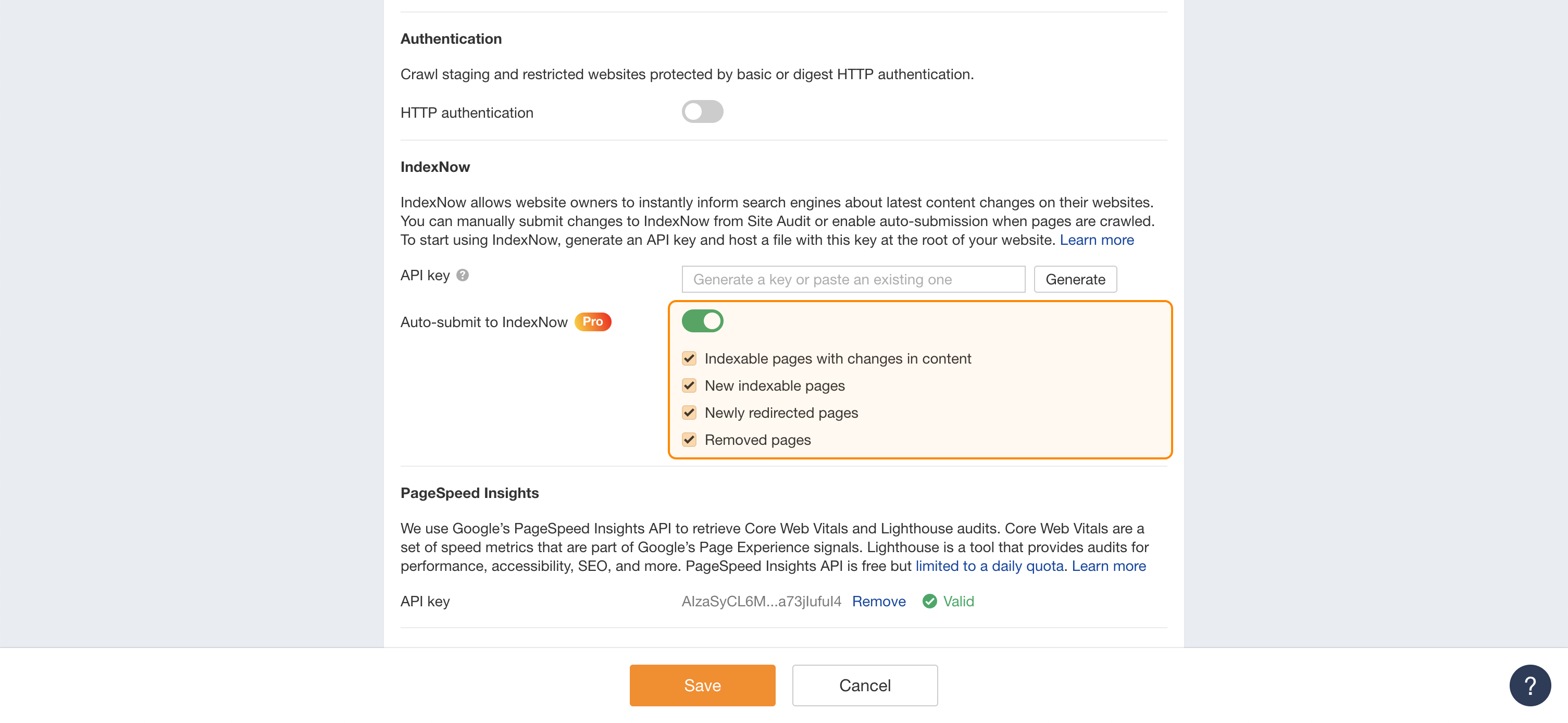 When auto-submission is enabled in Project settings, Site Audit will automatically submit specified changes to IndexNow during each site crawl.
You can choose from four auto-submission options:
Indexable pages with changes in content: Pages that existed previously but have undergone content changes.
New indexable pages: Newly discovered indexable pages or known pages that have become indexable since the last crawl.
Newly redirected pages: Previously indexable pages that now redirect.
Removed page: Previously indexable pages that have been removed from the site.
With auto-submission enabled, manual submission becomes unnecessary, and the "Pages to submit to IndexNow" issue will not be reported.
To track auto-submissions, four new fields have been added to Page Explorer. These fields are:
IndexNow auto-submission status: The status of IndexNow auto-submission. Possible values:
Success: The page was successfully submitted to IndexNow.
No changes detected: No changes were detected on the page; submission was not required.
Not eligible: The URL isn't eligible for submission, e.g., it's not an indexable HTML page.
Invalid API key: IndexNow submission failed due to an invalid API key.
Failed: Submission to IndexNow failed; see details for the reason.
Auto-submission is off: Automatic submission is disabled in Crawl settings.
IndexNow auto-submission time: The date and time when the URL was auto-submitted to IndexNow.
IndexNow auto-submission reason: The reason the page was considered for auto-submission to IndexNow. Reasons correspond to the four options in Project settings:
Indexable pages with changes in content
New indexable pages
Newly redirected pages
Removed pages
IndexNow auto-submission error message: The error description for a failed auto-submission.
By following these steps, you can efficiently notify search engines about important content changes on your website using the IndexNow protocol within Site Audit.
Alternative Method: Cloudflare Worker Workaround
If you're not on a Framer plan that supports well-known files, you can still implement IndexNow using a Cloudflare Worker. This method is more complex but provides a viable alternative.
For detailed instructions on this approach, check out this community guide on implementing Ahrefs IndexNow on Framer sites.
Conclusion
Setting up IndexNow on your Framer site has evolved from a complex workaround to a simple process that takes just minutes. By leveraging Framer's well-known files feature, you can easily verify your site ownership and start pushing content updates to search engines for faster discovery.
While IndexNow doesn't yet include Google, the protocol continues to gain adoption across major search platforms. As a quick SEO win that requires minimal effort, implementing IndexNow is a practical step every Framer site owner on a Pro plan or higher should consider taking.

Frequently Asked Questions
What is IndexNow for Framer?
IndexNow is an open protocol that allows you to instantly notify search engines like Bing when your Framer site's content is updated. This integration, facilitated by Framer's "well-known files" feature, helps get your new or changed pages indexed much faster than waiting for search engines to find them on their own.
How do I enable IndexNow on my Framer site?
You can enable IndexNow on Framer in three main steps using the "well-known files" feature available on paid plans. First, generate a free API key from a service like Bing Webmaster Tools. Second, create a .txt file named after your key and paste the key inside it. Finally, upload this file in your Framer project's Site Settings under the "Well-Known Files" section and publish your site.
Why should I use IndexNow if Google doesn't support it?
It is still highly beneficial to use IndexNow because it significantly speeds up indexing on other major search engines like Microsoft Bing, Yandex, and Naver. Bing powers search results for various platforms, including Yahoo and Microsoft products. Since the setup on Framer takes only a few minutes, it's a low-effort task for improving your site's visibility across a wider search ecosystem.
Is using IndexNow with Framer free?
Yes, the IndexNow protocol itself is completely free to use. However, to use the simplified "well-known files" feature for implementation, you will need to be on a paid Framer plan (Pro, Business, or Enterprise). Users on the free plan can use a more complex workaround involving Cloudflare Workers.
How is IndexNow different from submitting a sitemap?
IndexNow provides an instant, "push" notification to search engines for specific URLs that have changed, while a sitemap is a "pull" method where you list all your site's pages for search engines to crawl at their own pace. IndexNow is ideal for getting immediate attention for new or updated content, whereas a sitemap provides a comprehensive map of your entire site for regular crawling. They are complementary SEO practices.
How do I know if my IndexNow submissions are working?
You can confirm your submissions are working by monitoring their status in Bing Webmaster Tools and checking for a "200 OK" HTTP response code after submission. Other response codes can indicate issues: "400 Bad Request" for invalid formats, "403 Forbidden" for an invalid key, or "429 Too Many Requests" if you are submitting too frequently.
How often should I submit my Framer URLs to IndexNow?
You should submit a URL to IndexNow only when its content has been created, updated, or deleted. There is no benefit to submitting unchanged URLs repeatedly. The protocol is designed for event-based notifications, so use it precisely when a change occurs on your Framer site to ensure efficient crawling by search engines.
Dominate ChatGPT and Google Search
Synscribe helps B2B companies with SEO & GEO using programmatic SEO approach. Book a call to find out how we help you win.